
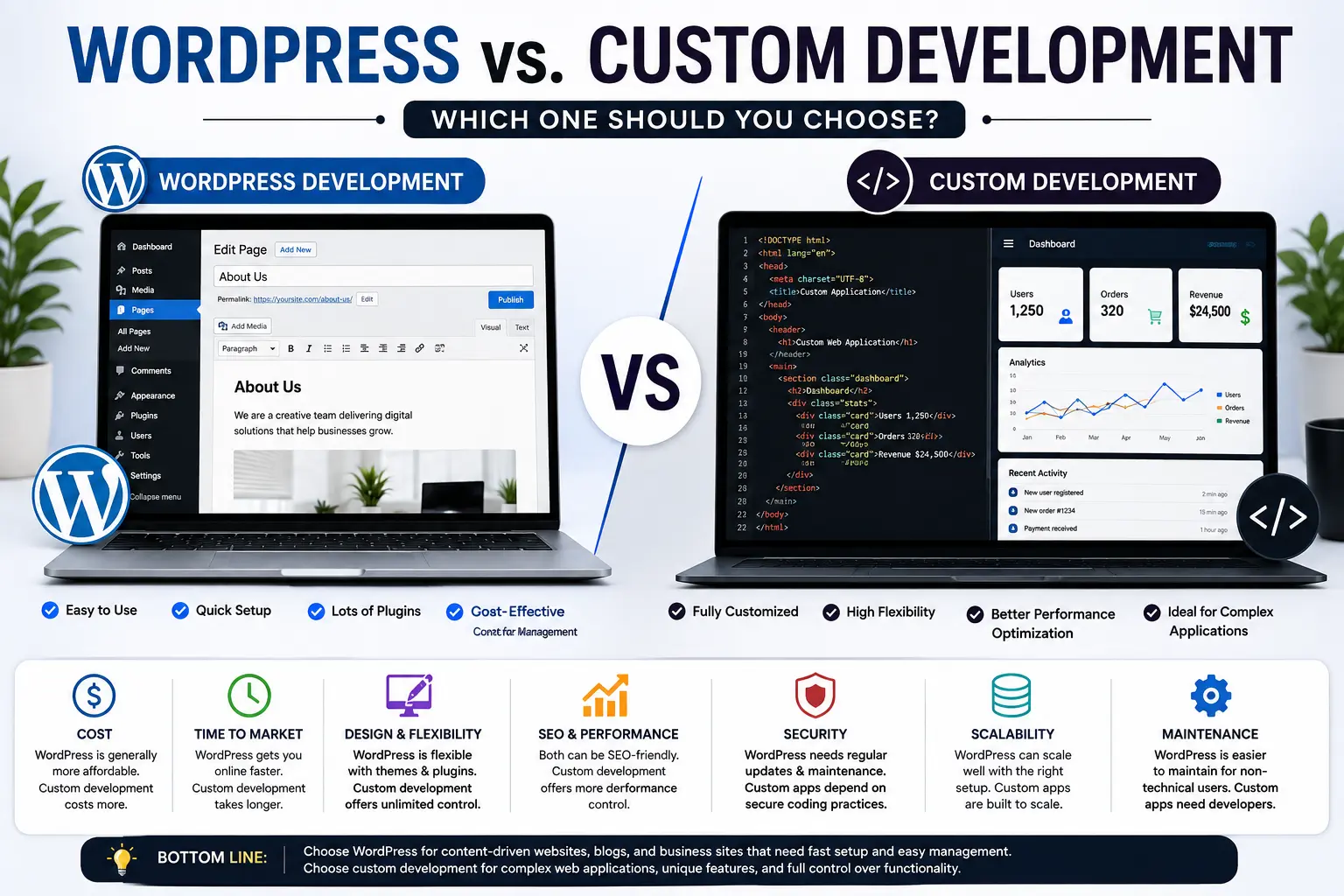
WordPress vs. custom development is a practical decision for businesses planning a new website, rebuilding an existing site, or launching a digital product. WordPress provides a content management system, themes, plugins, and an administrative interface, while custom development gives a development team control over the site’s architecture, functionality, and technology stack.
The right choice depends on what the website needs to do. A company blog, service website, portfolio, or content-driven business site may benefit from WordPress. A complex web application, specialized customer portal, or platform with requirements that do not fit an existing CMS may justify custom development.
WordPress itself can also be customized extensively. Its official developer documentation covers custom themes, plugins, custom post types, and other development options.
What Is WordPress Development?
WordPress development uses the WordPress content management system as the foundation of a website.
A typical WordPress project can combine:
- A WordPress theme
- Plugins
- Custom post types
- Custom fields
- Block patterns
- Custom templates
- PHP
- JavaScript
- CSS
- Database-driven content
- Third-party services
WordPress supports both block themes and classic themes. Block themes use the Site Editor and are built around blocks, while classic themes primarily use PHP, JavaScript, and CSS.
WordPress can therefore range from a relatively simple website assembled from existing components to a heavily customized publishing platform developed by a professional team.
For businesses that need a content-focused website, this flexibility can reduce the amount of custom infrastructure required.
What Is Custom Website Development?
Custom development means building a website or web application around specific business and technical requirements rather than using WordPress as the central CMS.
A custom project may use technologies such as:
- HTML
- CSS
- JavaScript
- PHP
- Python
- Node.js
- React
- Databases
- APIs
- Web frameworks
- Cloud services
The exact technology stack depends on the application.
MDN notes that modern web development can use HTML, CSS, JavaScript, server-side technologies, and frameworks to create dynamic websites and applications.
Custom development is useful when the website requires functionality that is better implemented as a purpose-built application.
WordPress vs. Custom Development at a Glance
| Factor | WordPress | Custom Development |
|---|---|---|
| Initial setup | Usually faster | Usually requires more development |
| Technical flexibility | High with customization | Very high |
| Content management | Built in | Must be built or integrated |
| Development cost | Often lower for standard websites | Usually higher for specialized projects |
| Time to launch | Often shorter | Often longer |
| Maintenance | Core, theme, and plugin maintenance | Codebase and infrastructure maintenance |
| Design control | High with custom themes | Full control |
| SEO | Strong with proper configuration | Full technical control |
| Scalability | Can scale with suitable architecture | Architecture can be designed around requirements |
| Hosting | WordPress-compatible hosting | Depends on technology stack |
| Custom functionality | Plugins and development | Built specifically for the project |
| Technical expertise | Moderate to high depending on customization | Usually high |
There is no universal winner. The decision should be based on requirements, budget, development resources, and the expected life of the project.
Cost: WordPress vs. Custom Development
Cost is often the first factor businesses consider.
WordPress can reduce development requirements for standard website functions because the CMS already provides content management capabilities. Businesses can start with an existing theme or create a custom theme instead of building a complete publishing system.
Custom development usually requires more engineering work because the team may need to build features such as:
- User authentication
- Content management
- Administrative dashboards
- Search
- Forms
- Database structures
- APIs
- User roles
- Reporting
- Integrations
This does not mean every WordPress project is inexpensive. A heavily customized WordPress website can require significant development, design, testing, hosting, and maintenance.
The better comparison is not simply WordPress is cheap and custom development is expensive. Instead, compare the total cost required to achieve the project’s actual requirements.
Development Time
WordPress can shorten development time when the project uses features already supported by the platform.
For example, a business website may need:
- Homepage
- About page
- Service pages
- Blog
- Contact form
- Navigation
- Media management
These are common website requirements, and WordPress already provides a content management foundation.
A custom website may require those same functions to be designed, developed, tested, and maintained as part of the application.
Custom development can still be efficient for specialized projects because developers do not need to adapt a CMS to requirements it was not designed to handle.
The important question is:
How much of the required functionality already exists in the chosen platform?
Flexibility and Customization
Custom development provides direct control over the application’s architecture.
Developers can decide:
- How data is stored
- How users authenticate
- How APIs communicate
- How business rules operate
- How the frontend is rendered
- How the backend processes requests
- How integrations are structured
WordPress also supports substantial customization.
Its developer documentation recommends keeping site-critical functionality in plugins rather than themes so that functionality remains available when the design changes.
WordPress also supports custom post types for specialized content such as products, courses, reviews, or other structured information.
This makes WordPress suitable for projects that need more than a basic blog but still benefit from an established CMS.
SEO: Which Option Is Better?
Neither WordPress nor custom development automatically produces better SEO.
Search performance depends on technical implementation, content quality, search intent, site architecture, internal links, structured data, page experience, and other factors.
WordPress provides access to many SEO plugins and allows developers to customize important technical elements. Custom development provides direct control over the site’s HTML, rendering, URLs, metadata, structured data, and technical architecture.
The risk with WordPress is not the platform itself. Problems can arise from poorly configured themes, excessive plugins, duplicated functionality, weak internal linking, or performance issues.
The risk with custom development is that SEO requirements may be overlooked during development.
For a WordPress website, use a structured SEO process alongside development. Your ultimate guide to on-page SEO can help organize titles, headings, internal links, content structure, and other on-page elements.
You can also review SEO best practices for 2025 for broader optimization planning.
Performance and Page Speed
Performance depends more on implementation than on whether a site uses WordPress or custom code.
A WordPress website can experience performance problems because of:
- Oversized images
- Poorly coded plugins
- Excessive scripts
- Unoptimized themes
- Weak hosting
- Database inefficiencies
- Third-party services
A custom application can experience similar problems because of:
- Inefficient queries
- Excessive JavaScript
- Poor caching
- Large assets
- Slow APIs
- Weak server configuration
- Unnecessary third-party requests
MDN identifies loading speed and responsiveness as important parts of web performance and explains that HTML, CSS, and JavaScript all affect how websites perform.
For practical optimization, see how to improve your website’s speed for better SEO.
Security Considerations
Security requires ongoing maintenance regardless of the development approach.
With WordPress, site owners need to keep the WordPress core, themes, plugins, PHP environment, and hosting configuration maintained. WordPress’s current hosting guidance recommends a modern PHP version, supported database software, and HTTPS.
Custom development shifts the responsibility toward the development and infrastructure team.
A custom application still requires:
- Dependency updates
- Access control
- Authentication security
- Input validation
- Secure database practices
- Server security
- Backup procedures
- Monitoring
- Vulnerability management
Custom code is not automatically more secure than WordPress. Security depends on the quality of the implementation and maintenance process.
Maintenance Requirements
WordPress maintenance usually includes:
- Updating WordPress core.
- Updating themes.
- Updating plugins.
- Testing compatibility.
- Monitoring backups.
- Reviewing security.
- Checking website performance.
- Removing unused components.
Custom applications require a different maintenance process.
Development teams may need to update:
- Frameworks
- Libraries
- Server software
- APIs
- Database systems
- Dependencies
- Custom application code
- Infrastructure
The maintenance burden should therefore be considered before development begins.
Scalability
Scalability means the website or application can continue handling increased requirements without becoming difficult or costly to operate.
WordPress can support substantial websites when hosting, caching, database management, themes, plugins, and architecture are handled appropriately.
Custom development offers greater control over the architecture from the beginning. Developers can design the system around specific traffic patterns, data requirements, user roles, APIs, and application workflows.
A business should not choose custom development solely because it expects growth.
Instead, identify the type of growth expected.
For example:
| Growth Requirement | Suitable Consideration |
| More blog posts | WordPress can be suitable |
| More service pages | WordPress can be suitable |
| Larger content team | WordPress can be suitable |
| Complex user accounts | Evaluate WordPress customization or custom development |
| Advanced SaaS functionality | Custom development may be more appropriate |
| Specialized business workflows | Compare both architectures |
| Complex real-time application | Custom development may provide greater control |
When WordPress Is the Better Choice
WordPress is often a strong option when your main requirements include content publishing, marketing, lead generation, business information, and standard website functionality.
Choose WordPress when:
- You need to launch a website within a defined timeframe.
- Your team needs a familiar content management interface.
- The website is content-driven.
- You publish articles regularly.
- You need flexible page creation.
- You want access to an established plugin ecosystem.
- Your requirements fit WordPress’s architecture.
- You want developers to customize the platform without building a CMS from scratch.
For SEO teams, marketers, and publishers, the ability to manage content without editing application code can be a practical advantage.
When Custom Development Is the Better Choice
Custom development becomes more attractive when the website is actually a software product.
Consider custom development when you need:
- Complex user dashboards
- Specialized workflows
- Advanced account management
- Real-time functionality
- Complex API integrations
- Custom business logic
- Large-scale application features
- Specialized data processing
- A technology stack that does not fit WordPress
- Precise control over application architecture
For example, a SaaS platform with complex user permissions, subscriptions, real-time data, and multiple backend services may be better treated as an application rather than a traditional WordPress website.
Can WordPress and Custom Development Work Together?
Yes.
A project does not always need to choose one technology for every function.
For example, a company could use WordPress for:
- Marketing pages
- Blog content
- Documentation
- Landing pages
- SEO content
And use a separate custom application for:
- Customer dashboards
- Account management
- Internal tools
- Complex transactions
- Specialized workflows
WordPress can also interact with external systems through APIs and custom development.
This hybrid approach can be useful when marketing content and application functionality have different technical requirements.
WordPress vs. Custom Development for Small Businesses
For many small businesses, WordPress is a practical starting point.
A local service company, consultant, agency, restaurant, professional firm, or small ecommerce operation often needs a website that provides:
- Business information
- Service pages
- Contact options
- Location details
- Blog content
- Lead-generation forms
- Search-friendly pages
Building these functions from scratch may create development costs without providing a corresponding business advantage.
If local search is important, combine the website decision with a broader local SEO strategy.
WordPress vs. Custom Development for Startups
Startups should evaluate the product rather than choosing a technology based only on the brand name.
If the startup needs a marketing website while validating its business model, WordPress can provide a faster content platform.
If the startup’s core product is a web application, custom development may be more suitable for the product itself.
A common architecture can therefore include:
WordPress → Marketing and content
Custom application → Product and customer experience
This separates content management from specialized application functionality.
How to Make the Right Decision
Before choosing WordPress or custom development, answer these questions:
1. What Does the Website Need to Do?
Write down every required function instead of starting with a technology preference.
2. Who Will Manage Content?
If marketers and business staff need to publish content frequently, a CMS can simplify the workflow.
3. What Integrations Are Required?
List payment systems, CRM platforms, analytics tools, APIs, email platforms, inventory systems, and other integrations.
4. What Is the Expected Development Budget?
Compare development, hosting, maintenance, updates, and future feature costs.
5. How Much Custom Functionality Is Required?
Separate normal website features from functions that require application-level engineering.
6. Who Will Maintain the Website?
A technology decision should account for the skills available after launch.
7. What Is the SEO Strategy?
Make sure the selected architecture supports crawlable content, clean URLs, metadata, internal links, structured data, performance, and mobile usability.
For keyword planning, your team can also use this guide on how to conduct effective keyword research for SEO.
A Simple Decision Framework
Use this framework before approving a development project:
| If Your Priority Is… | Consider |
| Content publishing | WordPress |
| Business website | WordPress |
| Blog and SEO content | WordPress |
| Fast website launch | WordPress |
| Custom marketing design | WordPress with custom development |
| Complex web application | Custom development |
| Advanced business logic | Custom development |
| Specialized customer portal | Custom development |
| Real-time application | Custom development |
| Both content and complex software | Hybrid approach |
The decision becomes clearer when the website’s requirements are documented first.
Frequently Asked Questions
Is WordPress better than custom development?
WordPress is better for many content-driven websites because it provides an established CMS and can be extended through themes, plugins, and custom development. Custom development is better suited to applications with specialized technical requirements.
Is custom website development more expensive than WordPress?
Custom development often requires more engineering work for standard website functionality, but total cost depends on the project’s requirements. A heavily customized WordPress project can also require substantial development and maintenance.
Which is better for SEO, WordPress or custom development?
Neither platform automatically has an SEO advantage. Both can support strong SEO when technical architecture, content, performance, accessibility, structured data, internal linking, and other requirements are implemented correctly.
Is WordPress good for business websites?
Yes. WordPress can be suitable for business websites that need service pages, blogs, landing pages, contact forms, media management, and regular content updates.
When should I choose custom web development?
Consider custom development when your website requires specialized workflows, complex application logic, advanced user accounts, real-time functionality, complex integrations, or an architecture that does not fit WordPress well.
Can WordPress handle a large website?
WordPress can support large and complex websites when the architecture, hosting, database, caching, themes, plugins, and development practices are appropriate. The platform should be evaluated against the site’s actual technical requirements.
Is WordPress easier to maintain than a custom website?
WordPress provides a standardized CMS, but it requires regular updates and compatibility testing for core software, themes, plugins, and the hosting environment. Custom applications require maintenance of their own code, frameworks, dependencies, infrastructure, and integrations.
Can I migrate from WordPress to custom development later?
Yes. Migration is possible, but the complexity depends on the site’s content model, URLs, integrations, database structure, user accounts, and application requirements. Planning content portability from the beginning can reduce migration difficulty.
Can I combine WordPress with custom development?
Yes. WordPress can manage marketing and editorial content while a separate custom application handles specialized functionality. APIs and custom integrations can connect the systems.
Conclusion
WordPress vs. custom development is not a choice between a good technology and a bad one. It is a decision about how closely the technology should match the website’s requirements.
WordPress is a practical choice for many businesses, publishers, agencies, and content-focused websites because it provides an established CMS with themes, plugins, and development tools. Custom development becomes more appropriate when the project functions primarily as a specialized software application.
The strongest decision starts with requirements rather than technology. Document the features, content workflow, integrations, SEO needs, performance expectations, security responsibilities, maintenance resources, and future functionality before selecting the architecture.
For a standard business or content website, WordPress may provide the right balance of flexibility and development effort. For a complex digital product, custom development may provide the architectural control required. A hybrid approach can also combine WordPress content management with custom application functionality.